Home office ergonomics: how your setup affects your body

“Many remote workers spend hours each day in workstations that encourage awkward postures, limited movement, and prolonged static positions.”
“Anywhere" office
The shift to remote work was more than a temporary response to the COVID-19 pandemic. It fundamentally changed where many people spend their working hours.
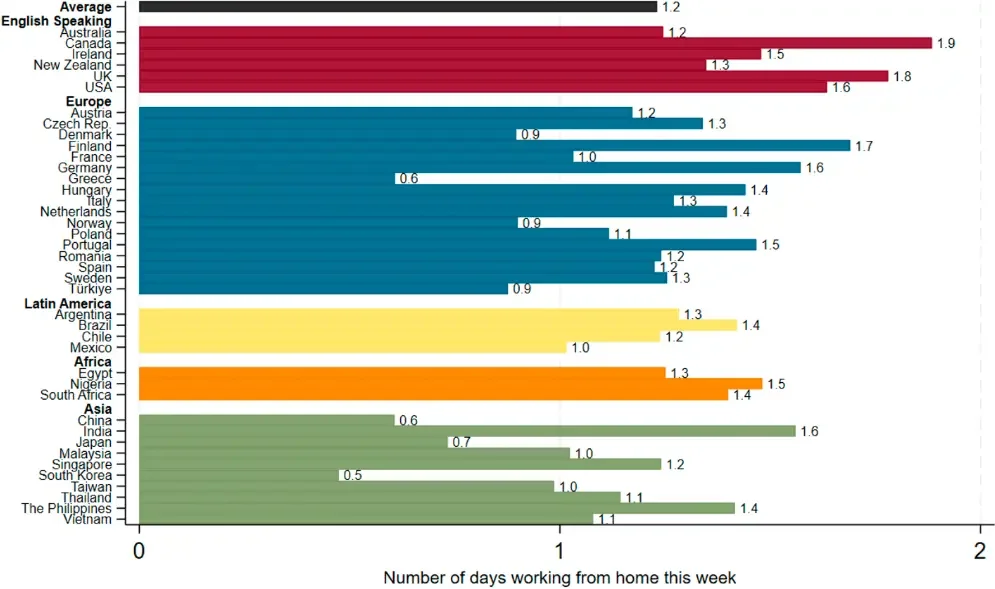
Recent data (1) show that work-from-home (WFH) arrangements have settled into a new reality. Globally, college-educated employees now work from home approximately one day per week on average, a substantial increase compared to pre-pandemic levels, when remote work was far less common.
In English-speaking countries such as the United States, the United Kingdom, and Canada, remote work remains even more prevalent, with employees working from home approximately 1.5 to 1.9 days per week.
Remote work remains popular across all genders, although there are slight differences in the average number of days worked from home:
Men: ~ 1.25 days per week (down from 1.55 in 2022).
Women: ~ 1.22 days per week (down from 1.55 in 2022)
The data indicates that younger and mid-career professionals tend to work from home slightly more often than older employees:
Ages 20–33: ~ 1.25 days per week.
Ages 34–46: ~ 1.24 days per week.
Ages 47–64: ~ 1.21 days per week
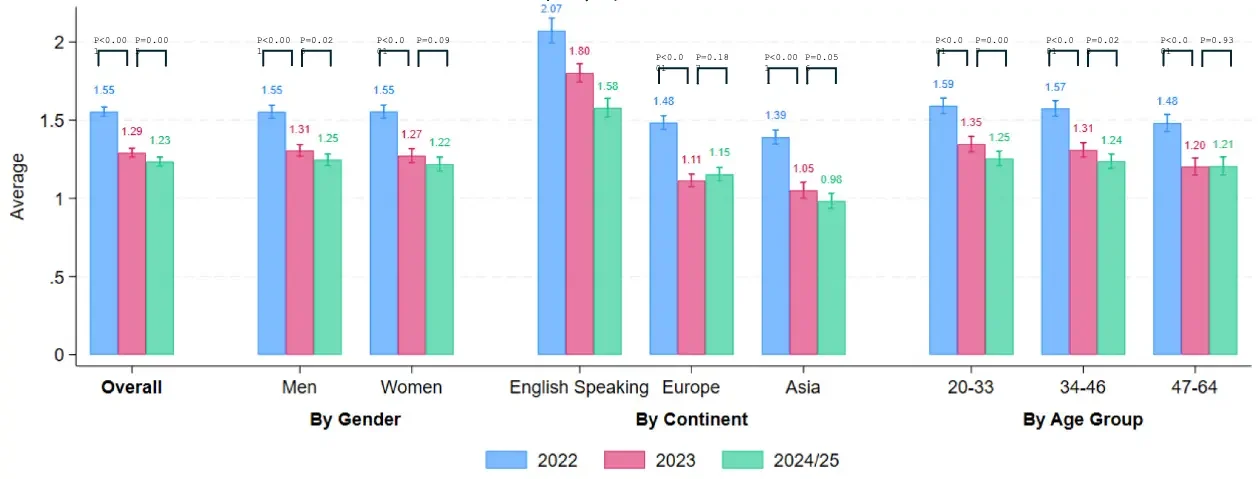
Taken together, these findings suggest that working from home is no longer a niche arrangement. For millions of people, it has become a regular part of the working week.
The challenge is that most homes were never designed to function as full-time workspaces.
Kitchen tables, couches, dining chairs, and laptop screens often become improvised office setups. While these arrangements may be convenient, they frequently lack the ergonomic support needed for prolonged computer work.
As a result, many remote workers spend hours each day in workstations that encourage awkward postures, limited movement, and prolonged static positions.
This does not mean you need an expensive standing desk, ergonomic chair, or complete office renovation. However, it does mean that the way you arrange your workspace can influence how your body feels during and after the workday.
The good news is that small adjustments to screen height, chair position, keyboard placement, and movement habits can often make a meaningful difference.
Understanding these principles is the first step toward creating a healthier home office setup.
Why ergonomics matters for movement breaks
While this guide focuses on home office ergonomics, it is important to understand that even a perfectly designed workstation cannot eliminate the effects of prolonged sitting.
Research suggests that ergonomic improvements can reduce discomfort, improve posture, and decrease physical strain. However, they do not replace the need for regular movement.
In other words, good ergonomics helps you sit better, but it does not solve the problem of sitting too much.
Optimize your workspace setup to reduce unnecessary physical stress and improve comfort.
Take regular movement breaks to interrupt prolonged sitting and expose the body to a greater variety of movement.
Think of ergonomics and movement as partners rather than competitors. One helps create a better working environment, while the other helps counter the physiological effects of remaining in the same position for too long.
For practical movement strategies, see our guide “Movement breaks at work: a 1-minute system for desk workers.”
The laptop effect
This sudden transition has forced millions to modify their physical spaces, furniture, and digital resources, often without any prior experience or adequate preparation. While ergonomic risks in conventional offices are well-documented, there is a notable lack of research evaluating the specific conditions of home-based work scenarios.
The "anywhere" office frequently involves prolonged static postures and extensive computer use, which can significantly impact physical well-being. These environments often force the body into sustained static head and neck postures, alongside repetitive movements like shoulder flexion during typing. These forced positions result in increased muscular effort, particularly in the neck, shoulders, and arms.
The 2025 study discussed in this post (*2) found a direct relationship between trunk posture and increased neck muscle activity, showing how a poorly adjusted workstation can strain the entire upper body.
And our primary tool in this environment is the laptop. Unlike desktop computers, laptops physically connect the screen and keyboard into a single unit creating a unique ergonomic problem.
The primary biomechanical issue is screen height. Because laptop screens sit below eye level, they naturally pull the head forward into cervical (neck) flexion.

The image exaggerates the effect slightly, but it illustrates the general principle.
Biomechanical analysis (*2) shows that:
Using a laptop significantly increases head flexion compared to a standard monitor, with increases observed across all work percentiles: 33% in static positions, 29% in median positions, and 23% in dynamic positions.
This configuration leads to much higher average activity in the cervical (neck) muscles.
Because laptop keyboards are compact, they pull the arms closer to the torso, which is expected to increase deltoid muscle activity.
Over time, these postural changes may contribute to neck discomfort, shoulder fatigue, and upper-back stiffness, particularly when combined with long periods of uninterrupted sitting.
Improvised furniture
It isn’t just the device that causes strain, the furniture we use like dining tables or kitchen counters often creates a "perfect storm" for musculoskeletal discomfort.
Many home tables are higher than an office desk. A high table configuration significantly increases upper trapezius effort (shoulders muscles). When the table is too high (e.g., 10 cm above elbow level), the level of static muscle effort in the upper trapezius increases by more than 43% compared to a well-adjusted table.
While high tables might slightly reduce neck flexion, this positive effect is marginal compared to the massive increase in shoulder and upper back muscle exertion.
Most household chairs lack armrests, leaving the forearms and wrists unsupported. This absence of support elevates activation in both the neck and deltoid muscles. Specifically, without arm support, maximum effort in the neck can increase by 103%. Furthermore, using a chair without armrests has been shown to significantly increase trunk inclination, leading to less ergonomic overall alignment.
The practical lesson is simple:
A laptop on a kitchen table may be convenient, but it is rarely an ergonomic workstation.
Biomechanical solutions
The good news is that most home-office ergonomic problems can be improved with relatively simple adjustments.
Here are a few evidence-based recommendations:
Adjust your workstation height using a simple anthropometric rule: align the table height with your elbow level when your arms are bent at approximately 90°. This minimizes both shoulder and neck effort.
Laptops should always be complemented with elevating bases (stands) to bring the screen to eye level, which encourages a neutral neck posture.
When the laptop is elevated, use an external keyboard and mouse to allow for proper arm and wrist positioning.
Prioritize chairs with adequate arm support to reduce the burden on your neck and deltoid muscles.
Avoid prolonged use of tablets on your lap. Instead, use a stand to maintain a viewing angle between 10° and 20° below your horizontal line of sight.
Conclusion
The "anywhere" office is here to stay, but our current setups are often working against our biology. Poor ergonomic configurations -high tables, unsupported arms, prolonged laptop use - directly increase muscle strain and worsen posture.
The evidence is clear:
The way you configure your workspace directly influences your posture, movement options, and the physical demands placed on your body throughout the day.
At the same time, ergonomics is only one part of the equation. A well-designed workstation can reduce strain, but it cannot eliminate the effects of prolonged sitting. Regular movement remains an essential component of long-term health and comfort while working from home.
To address both sides of the equation better ergonomics and more movement consider incorporating the principles of MicroDosing Training into your daily routine.
References:
Aksoy, C. G., Barrero, J. M., Bloom, N., Davis, S. J., et al. (2025). The global persistence of work from home. Proceedings of the National Academy of Sciences. https://www.pnas.org/doi/10.1073/pnas.2509892122
Trujillo-Guerrero, M. F., Venegas-Toro, W., De la Cruz-Guevara, D., & Zambrano-Orejuela, I. (2025). A Biomechanical Analysis of Posture and Effort During Computer Activities: The Role of Furniture. Safety, 11(4), 122. https://www.mdpi.com/2313-576X/11/4/122
Read more posts: